Dental patient reactivation is the work of bringing back patients who have gone quiet: overdue for a cleaning, sitting on treatment they never scheduled, or simply gone for more than a year. It is also one of the more compliance-heavy kinds of marketing a practice runs, because every message goes to a person whose health information you already hold. This guide gives you a 90-day sequence, and it sorts each message by the rules that apply to it before a single text goes out.

Who Counts as a Dormant Patient
Practices usually split lapsed patients into three groups, and the split matters because each group needs a different message.
- Overdue recall: due for hygiene and never rebooked. This is the easiest group to win back.
- Unscheduled treatment: a diagnosis was made, the patient said maybe, and nothing was booked.
- Inactive: no visit in 12 to 18 months or longer.
Pull each one as its own list from your practice management software, because a patient with a pending crown needs a very different conversation from one who simply skipped a cleaning.
Why Dental Patient Reactivation Comes Before New-Patient Ads
The numbers circulating in dental marketing are mostly vendor figures, so treat them as directional. A compilation from Clerri reports that about 25% of patients have outstanding treatment and no appointment on the books, that hygiene recall runs 65% to 70% on average, and that 35% to 40% of dormant patients schedule when contacted directly. It also reports that four to five contact attempts lift reactivation by 81% compared with a single message. Several of those figures trace back to a 2020 whitepaper and to other vendors, and none has been independently checked.
Even discounted heavily, the direction holds. These patients already know your office, your hygienist and your parking lot. A practice that spends its whole budget on strangers while hundreds of its own records sit untouched has the order backwards.
The Step Most Guides Skip: Sort Every Message by Its Rules
Most reactivation advice stops at timing and tone. The step that protects the practice comes before either: deciding what kind of message you are sending. HIPAA and the Telephone Consumer Protection Act (TCPA) ask different questions about the same text, and they can give different answers.
HIPAA asks what the message is for. According to HHS guidance on marketing, marketing generally requires a patient’s written authorization, but communications made for treatment, and descriptions of the covered entity’s own health-related services, are carved out. HHS also treats payment from a third party for a patient list or a promotion as marketing with no exceptions. The TCPA asks a different question: whether you have the consent needed to send an automated text to that number at all. Our breakdown of TCPA texting rules for practices covers the two consent tiers and the 8 a.m. to 9 p.m. window in detail.
Here is how we would sort the messages a reactivation campaign usually contains. This is our reading for general planning, not legal advice, and your counsel should confirm it for your state.
| Message type | HIPAA view | Text consent to plan for |
|---|---|---|
| Overdue hygiene reminder | Generally a treatment communication | Written consent, because recall pitches sit on the marketing side of the TCPA line |
| Follow-up on a specific unscheduled treatment | Treatment communication; keep clinical detail out of the message body | Express consent for treatment messages |
| General “we miss you” check-in | Low risk if it carries no health detail | Written consent |
| Promotional offer for the practice’s own services | Usually within the own-services exception unless a third party is paying | Written consent |
| Patient list shared with a vendor for the vendor’s own use | Marketing; authorization required | Not applicable until HIPAA is cleared |
The practical conclusion is blunt. Three of the five rows depend on written consent that many practices never collected from older patients. The patients most likely to be dormant are the ones whose consent records are oldest, so a reactivation list should be filtered by consent status before it is filtered by anything else. Where consent is missing, the channel is a phone call from a person, a mailed card, or nothing.
A 90-Day Dental Patient Reactivation Plan
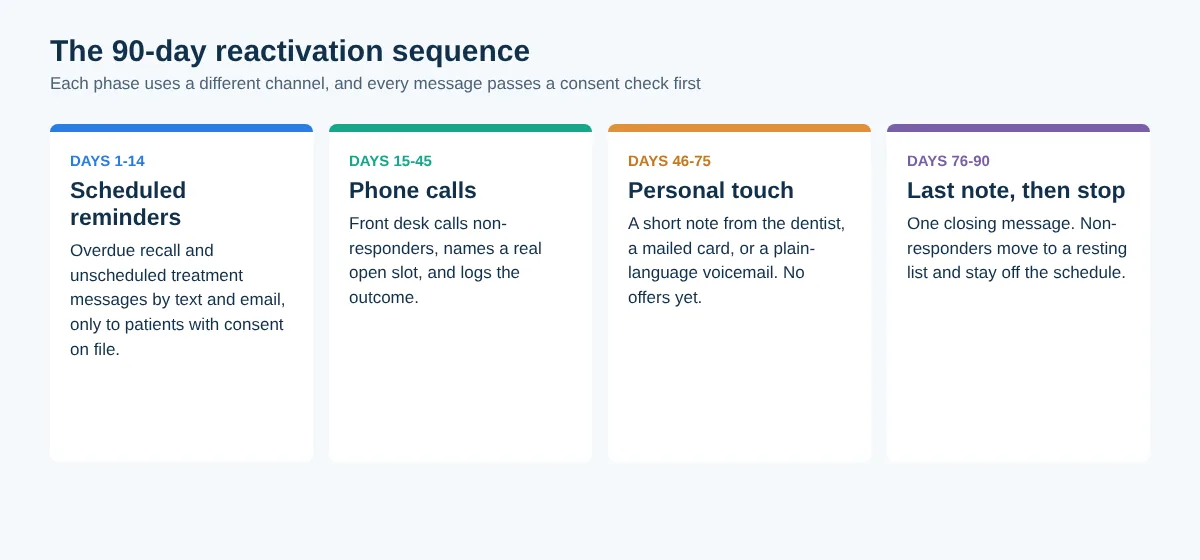
The structure below borrows its four-phase shape from the campaign described by Bulletproof Dental Practice, then adds the consent gate on top. The channel changes at every phase, because a patient who ignored two texts rarely answers a third identical one.
Days 1 to 14: scheduled reminders
Send overdue-recall and unscheduled-treatment messages by text and email, only to patients with the right consent on file. Keep the wording plain: the patient’s first name, the practice name, a reason to come back, a link or number to book. Leave diagnoses, procedures and amounts out of the text itself. Each message carries an opt-out line, and a STOP reply is honored and logged the same day.
Days 15 to 45: phone calls
Staff call everyone who did not respond. A call works best when it references the last visit and offers one specific open slot, not a vague invitation. Log every outcome in the chart: booked, declined, wrong number, asked to stop. If your front desk is stretched, an AI receptionist can take overflow calls, but check what it records and where that data goes before it touches patient lists.

Days 46 to 75: a personal touch
Change the format. A short note from the dentist, a handwritten card or a plain voicemail reads as a person remembering the patient rather than a system working through a list. No promotions in this phase.
Days 76 to 90: one last message, then stop
Send a single closing note that says the door is open. Patients who still do not respond move to a resting list and are left alone until their next natural touchpoint. Repeated contact past this point is how a practice turns a quiet patient into a complaint.
Timing this year
A plan that starts in mid-November reaches its phone-call phase right as calendar-year benefits are about to reset on January 1, which gives patients with unused coverage a real reason to book. Our year-end dental benefits campaign guide covers that angle if you want to run the two together.
Common Mistakes
- Texting the whole inactive list because the software can. Capability is not consent.
- Putting treatment details in the message body. A text can be read on a lock screen by someone other than the patient.
- Offering a discount to the entire list, which trains patients to wait for the next promotion and ties the message to the strictest consent tier.
- Giving the project to no one. One named person should own the list, the call log and the weekly count of booked patients.
- Continuing past 90 days. Chasing a patient well beyond the planned sequence earns complaints, not bookings.
FAQ
How long before a patient is considered inactive?
Most practices draw the line between 12 and 18 months without a visit. Patients overdue for recall but seen within that window are better handled as an overdue group, since a short reminder usually works without a full campaign.
How many times should we contact a dormant patient?
Reported figures suggest four to five attempts across different channels outperform a single message. Past the planned sequence, the case for another message gets weaker and the risk of a complaint grows, so end at 90 days and rest the record.
Can we text patients who have not visited in years?
Only if you hold the consent that fits the message type. Older records often lack written consent, so check before sending. Where consent is missing, use a staff phone call or a mailed card instead of an automated text.
Should dental patient reactivation messages include a discount?
Not by default. A reminder tied to the patient’s own care is simpler to defend than a promotion. If you do run an offer, send it only to patients with written consent and keep any third-party payment out of the arrangement.
Where This Leaves a Practice
In dental patient reactivation, the patients you already have are the cheapest ones to reach, and the legal exposure comes from the shortcuts taken to reach them in bulk. Filter by consent, match the channel to the message, rotate formats, and stop at day 90.